![DNA-B-Primary_White (7).png]](https://kb.dnabehavior.com/hs-fs/hubfs/DNA-B-Primary_White%20(7).png?height=50&name=DNA-B-Primary_White%20(7).png)
Release – July 21, 2026
Introducing Market Mood in GoDNA
Market Mood is now available in GoDNA, a behavioral pulse on the sentiment shaping today's market. For the first time in GoDNA, you can see how your clients are likely to feel as the market moves, and act before emotion drives a decision.
Market Mood reads each client's Unique Style against current market conditions and sorts them into one of four mood states: Exuberant, Comfortable, Watchful, or Apprehensive. You get an at-a-glance distribution of all your clients alongside a trailing 15-day S&P 500 view, so you can connect what the market is doing to how your clients are likely reacting to it.
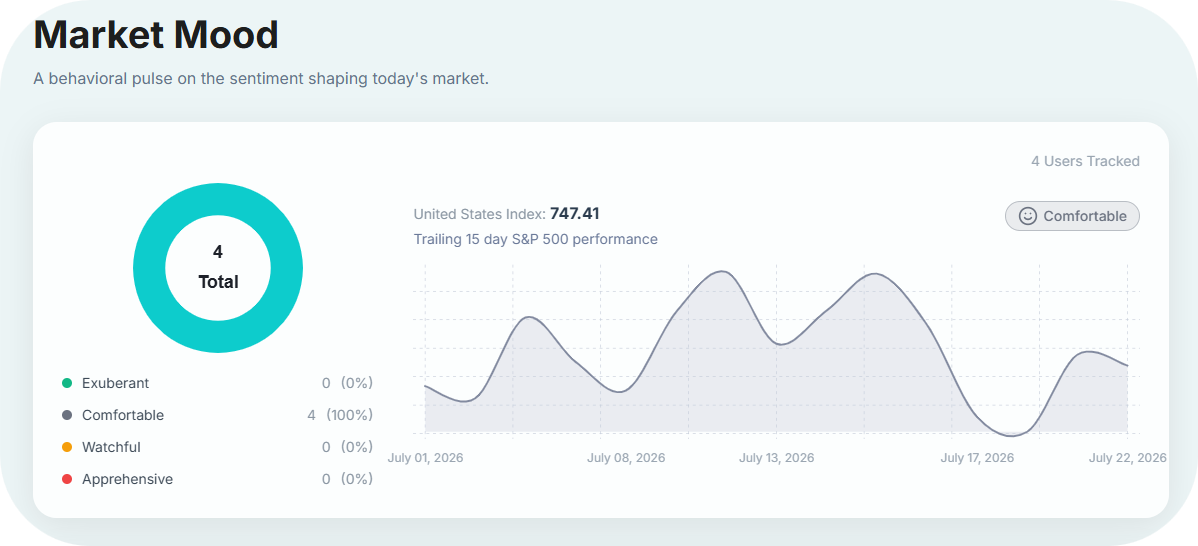
Below the overview, a searchable client list shows each person's Unique Style and current Market Mood, with filters for each mood state so you can quickly isolate who needs attention, such as everyone trending Apprehensive during a downturn.
Why this matters
Clients react very differently to the same market event, and managing those reactions usually happens after the calls start coming in.
Market Mood turns that into a proactive plan. By showing how your clients are likely feeling, and letting you drill down to the individual, GoDNA helps you prioritize outreach, tailor each conversation to the client's Unique Style, and steady clients before short-term emotion becomes a costly decision.
Log in to GoDNA to explore Market Mood.
Release – June 15, 2026
Simplified Signup Experience for GoDNA
Users can now create a GoDNA account and access the application without entering a credit card. The 14-day free trial will begin first, giving users time to explore GoDNA and experience its behavioral insights before any payment details are collected.
Payment information will only be requested after the trial period ends.
Why this matters
This update creates a smoother and more welcoming onboarding experience for new users.
By removing the need for card details at signup, users can begin their GoDNA journey with less friction and greater confidence. The updated flow allows users to explore the platform, understand its value, and engage with their behavioral insights before deciding to continue beyond the trial period.
Log in or create your GoDNA account to experience the updated signup flow.
Release – June 08, 2026
Enhanced Dashboard Experience and Ask GeneAI Integration
We've released a new update to GoDNA, introducing several improvements designed to make the application more intuitive, personalized, and easier to navigate.
This release focuses on enhancing the Dashboard experience, improving access to key actions, and bringing deeper behavioral insight into the My Report section through GeneAI.
What’s new as of May 21, 2026
Recommended Next Step
- A new Recommended Next Step section has been added to the Dashboard page and positioned towards the bottom of the page.
- This section dynamically changed based on different categories of users, helping display more relevant guidance depending on the user's profile, progress, and application journey.
Daily Insight
- A new Daily Insight section has been added to the Dashboard page. This provides users with a brief daily behavioral insight, helping them stay engaged with their personal development in a simple and meaningful way.
New Dashboard Cards
To improve system navigation and make key actions easier to access, four new cards have been added to the Dashboard page:
- View My Report
- Add a Contact
- Style Match
- Manage Subscription
These additions enhance overall user experience by giving users quicker access to important features within GoDNA. The updated card layout supports a more streamlined journey through the application, reducing friction and making navigation feel more neutral.
Ask GeneAI Integration
GeneAI has now been improved in My Report page.
- Users can ask GeneAI more questions about their own behavioral report, making it easier to explore insights, understand results, and receive a more personalized explanation based on their unique style in a simpler way.
Additional Improvements
Various miscellaneous fixes and refinements have also been made across the application to improve stability, usability, and the overall GoDNA experience.
Log in to your GoDNA account to see the latest updates live.